PAPER TRADING ON AXIOM, GMGN & PADRE

Practice the trade.Risk none of the capital.

Read the coin and market cap already shown in your tab, paper-buy from the chart, scale out by percentage, and review every result with realistic P/L.

Live market-cap dataChart-side buy and sellNo wallet requiredLocal paper-trading data
READING MARKET CAP FROM AXIOM TABFULL EXTENSION + FLOATING WIDGET
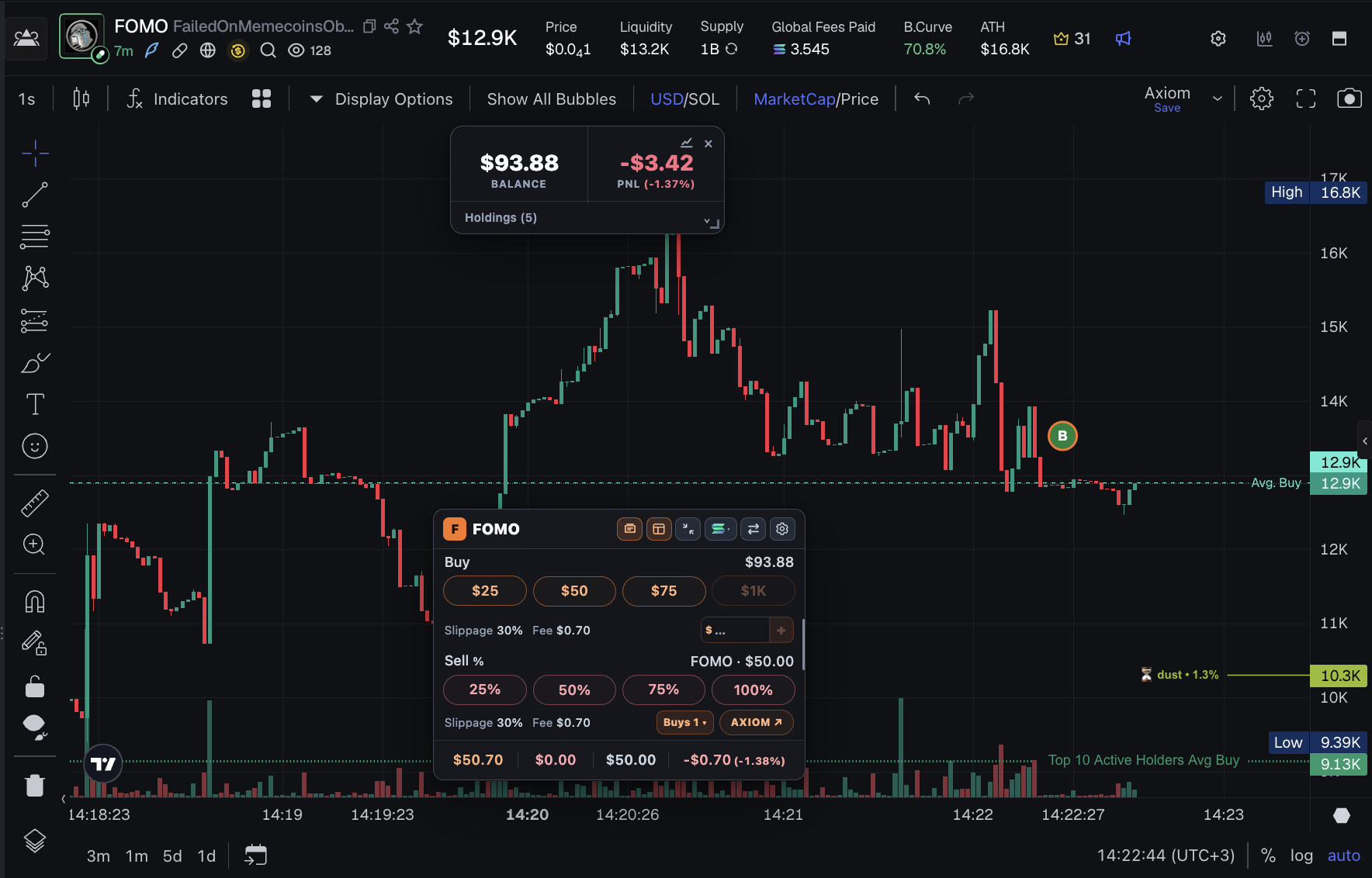
papertra.de floating trade widget over a rising Axiom market-cap chart with trade markers, position value, profit and loss, buy presets, and percentage sells
papertra.de extension overview showing wallet totals, two open coins, two positions, inline journal fields, and percentage sell controls
Trade where the chart is.Use the floating widget for fast entries, then open the full extension for positions, notes, history, settings, and review.

THE WIDGET, UP CLOSE

Custom buys. One clear position.

Add entries without leaving the chart. The widget keeps the weighted-average market cap visible, then expands the Buys counter so you can inspect each lot and its open P/L.

Compact papertra.de chart widget showing a profitable open position, average and current market cap, buy presets, and percentage sell controls
Compact position view
Expanded papertra.de chart widget showing two individual buy entries, their remaining amounts, entry market caps, open profit and loss, and percentage sell controls
Buy entries expanded
Axiom browser tabs marked with green and red direction circles and live open profit and loss percentages for PFS and ONEPLUM positions

LIVE DIRECTION + SAVED REOPEN LINKS

See the move. Return when you are ready.

Open position tabs show a green or red direction circle and live open P/L in the tab title. The widget also keeps the P/L direction of your other open coin tabs visible.

  1. OPEN

    Keep the supported coin page open for live market-cap and P/L updates.

  2. CLOSE

    Your position and exact coin link remain saved locally, but live updates pause.

  3. REOPEN

    Come back the next day or week and resume from the coin's current market cap.

papertra.de widget waiting for an open coin page while showing another position's profit and loss chip and a saved PFS Reopen shortcut

JOURNAL EVERY ENTRY

Write down why you bought it.

Beginners improve faster when they review the decision, not only the final P/L. Add your reason to an open coin, then find that note beside its buy entry in Transaction History.

  • Capture the idea while the position is still open.
  • Compare your reasoning with the result later.
Managed RAPEDOG position showing average and current market cap, partial-sell totals, the journal reason Interesting Narrative, and percentage sell controls
1. Manage and add your reason
papertra.de Transaction History showing RAPEDOG and SSPC buys and sells, taxes, realized profit and loss, and the saved journal reason Interesting Narrative beside both RAPEDOG buys
2. Review it in History

DIFFERENT LAUNCHES, DIFFERENT FLOORS

A more realistic zero for low-cap trades.

Choose a floor below the market cap where these coins usually begin. For example, if they commonly start around $5K, try a $2.5K floor, about 50%. A sensible floor makes downside estimates more realistic, while upside still follows normal market-cap movement.

  • $0 uses standard market-cap movement. No downside adjustment is applied.
  • Start near 50% of a typical launch. If coins usually begin around $5K, try $2.5K.
  • Upside stays normal. Buying at $5K and reaching $10K is still a 2x position.
  • Past trades stay intact. Each position keeps the floor it had when it was opened.
LAUNCH FLOOR$2.5K
BUY MARKET CAP$5K
FALLS TO $2.5K−100%Floor becomes the downside zero point
RISES TO $10K+100%Normal upside remains a 2× position

Example before buy and sell taxes.

REALISTIC PRACTICE, HONEST LIMITS

Close to real trading, not a perfect replay.

Paper-trading results are estimates, so they will not be 100% identical to a live trade. They are still close enough to practice decisions, review patterns, and build useful trading intuition without risking real funds.

01

A good floor improves accuracy

Match the floor to the usual launch range of the coins you practice to make downside calculations as realistic as possible.

02

Useful even without a precise floor

A $0 floor or a rough estimate still lets you practice entries, exits, position sizing, and review your decisions.

03

Built for learning

Use the results to compare choices and develop intuition, not as a guarantee of exact live-market execution.

THE REAL EXTENSION

A tighter loop from chart to review.

Practice the decisions around entries, exits, costs, and review. It never executes real orders or promises results.

01

Reads the active coin

The extension reads the coin and market-cap information already visible as you move between supported Axiom, GMGN, and Padre tabs.

02

Chart-side controls

Keep your balance, position value, open P/L, four saved buy presets, a custom buy amount, and 25% to 100% sell controls over the chart.

03

Multiple entries

Add to the same coin more than once. Individual buy lots stay in the ledger while the position shows a weighted-average entry market cap.

04

Position-safe selling

Scale out by percentage more than once. Sold cost and P/L become realized while the unsold portion remains open and tiny residuals close safely.

05

Taxes and timing

Configure buy tax, sell tax, and separate execution delays for paper buys and paper sells, with up to 60 seconds each.

06

History and journal

Filter buy and sell transactions, review taxes, attach a note to each coin, and return through its saved platform link.

07

Journey and monthly results

Review completed sells, wins, losses, win rate, gained, lost, and net P/L in a trade sequence or monthly calendar.

08

Backup and control

Export or import your trading data, start fresh with confirmation, and change the launch floor from the widget, Wallet, or Settings.

INSIDE PAPERTRA.DE

The views that matter most.

The chart widget leads. The popup is where positions, performance, and simulation settings stay organized.

papertra.de popup showing wallet balance, open and realized profit and loss, two open coins, average and current market caps, taxes, notes, and percentage sell controls

Positions, notes, and P/L

Scan wallet totals, open coins, average and current market caps, taxes, notes, percentage sells, and position P/L in one view.

papertra.de Trading Journey with completed sell results, wins, losses, win rate, and net profit and loss

Trading Journey

Follow completed sells in order, then switch to the monthly view to spot patterns over time.

Updated papertra.de Settings showing themes, Phantom mode, buy and sell taxes, separate delays, market-cap floor, custom widget buys, and backup controls

Settings and controls

Tune buy presets, buy and sell delays, taxes, and the default launch floor for new positions.

OPTIONAL PHANTOM MODE

A playful wallet-style view.

Switch the popup to a familiar, compact wallet-inspired layout when you want a different feel. It changes the appearance only. Your local simulator data and paper-trading behavior stay the same.

Unofficial visual theme. Not affiliated with Phantom.
papertra.de Phantom mode showing a wallet-inspired dark interface with a lemon avatar, balance, market-cap floor, navigation, and a paper-buy form

History filters

Separate buys and sells and review tax totals.

Journal notes

Keep the reason for a trade beside the position.

Saved coin links

Reopen the exact supported coin page later.

Backup and restore

Export, import, or confirm a complete fresh start.

papertra.de Fresh Start showing its permanent reset warning, starting balance presets, market-cap floor, taxes, widget buys, and execution delays

FLEXIBLE PRACTICE BANKROLL

Reset. Choose a new starting balance.

Fresh Start clears your trading progress, then lets you begin again with a preset or the exact custom balance you want to practice with.

  • Requires explicit permanent-reset confirmation.
  • Keeps taxes, market-cap floor, theme, and widget settings.
Export a backup first if you may want the old progress later.

HOW P/L WORKS

Clear accounting for practice trades.

Positions use market-cap movement plus your configured buy and sell taxes. Results remain an educational simulation, not a promise of live execution accuracy.

01

Multiple entries

New buys are tracked as individual lots and summarized with an average entry market cap.

02

Partial sells

Sold cost and profit move into realized P/L while the remaining position stays in open P/L.

03

Launch floor

An optional floor gives low-cap downside a more realistic zero point while preserving normal upside.

FROM WATCHING TO REVIEW

Practice in three moves.

1

Open a coin

Visit an Axiom, GMGN, or Padre coin page. The extension reads the active coin information already visible in the tab.

2

Paper trade the chart

Use custom buys, add entries, and scale out with percentage sells after any configured delay.

3

Review the result

Check open and realized P/L, history, journal notes, and Trading Journey performance.

START WITH THE COINS YOU ALREADY WATCH

Practice on the coins you already watch.

papertra.de is being prepared for release. Soon you can train without risking your wallet on the same charts you already study.

AXIOMGMGNPADRECHROMIUM

COMING SOON

Soon

Checkout and downloads are not open yet.

  • Chart-side paper trading
  • Launch market-cap floor
  • Separate buy and sell delays
  • Multiple entries and partial sells
  • History, Journal, and Journey
  • Backup and restore
  • Future extension updates
Coming soonRelease access will be available here

DESIGNED TO KEEP REAL FUNDS OUT OF REACH

Practice data in. No real-money access out.

For each simulation, papertra.de reads the coin and market-cap data already displayed in your supported browser tab. It does not connect to a wallet, request wallet keys, or submit real buy and sell orders.

01

Public tab data

Trade simulations use coin-page information visible on Axiom, GMGN, or Padre.

02

Local practice records

Your balance, positions, history, and settings stay in Chrome extension storage.

03

Transparent update check

Outside supported trading tabs, the extension contacts papertra.de only to check for available extension updates.

FAQ

The important details, plainly.

Does papertra.de place real trades?

No. It is an educational paper-trading simulator. Buys and sells update a virtual balance and local trade ledger; they never submit an order or connect a wallet.

Which platforms are supported?

The extension works with supported Axiom, GMGN, and Padre coin pages in Chromium-based browsers. It reads the coin and market-cap information already visible in the tab.

How does the market-cap floor work?

The optional floor becomes the downside zero point for a new position. At $0, standard market-cap movement applies. Above $0, downside between entry and the saved floor is stretched to −100%, while upside remains unchanged.

Where is my paper-trading data stored?

Balances, positions, transaction history, taxes, floor settings, and interface preferences are stored locally through Chrome extension storage. You can export a JSON backup and import it later.