PAPER TRADING GUIDE
How to paper trade meme coins without risking real money
Meme coin paper trading lets you practice entries, exits, position sizing, and review with a virtual balance. The market still moves; your real capital does not.
QUICK ANSWER
The short version
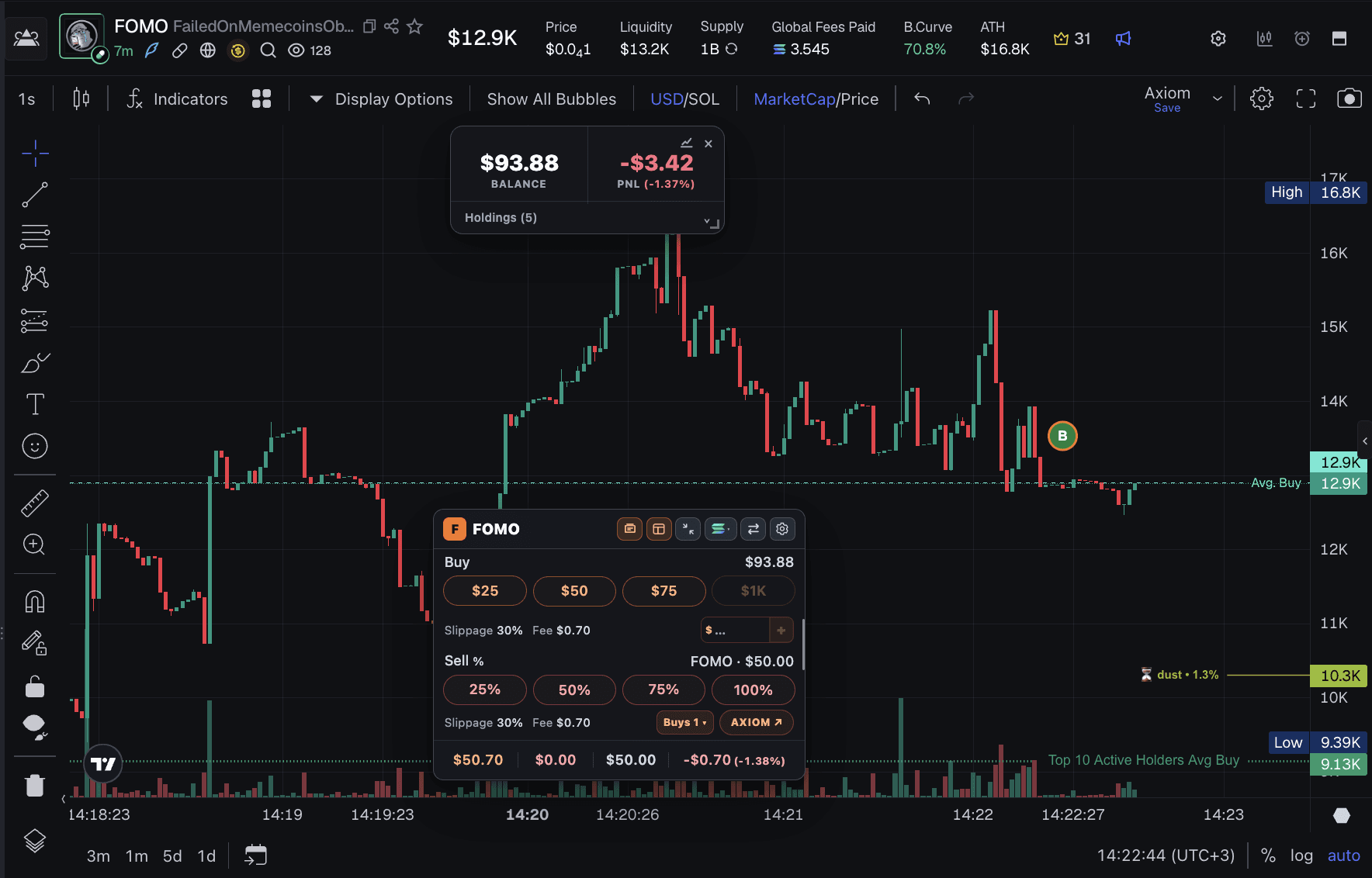
Install papertra.de, open a supported meme coin page on Axiom, GMGN, or Padre, choose a virtual buy amount, and manage the position beside the live chart. No wallet or deposit is required.
01
What does paper trading meme coins mean?
Paper trading is a simulation. You make buy and sell decisions against market prices, but the balance, position, and profit or loss are virtual. It is a practical way to learn a workflow before deciding whether you are ready to use real capital.
The useful part is not producing a large imaginary return. It is practicing repeatable decisions: why you entered, how large the position was, where the idea became invalid, and whether you followed the exit you planned.
02
1. Install the simulator and choose a platform
Add papertra.de from its official Chrome Web Store listing, then open a supported coin or discovery page on Axiom, GMGN, or Terminal/Padre. The extension places its paper-trading controls alongside the market interface you are already viewing.
- No Papertrade account is required.
- No wallet connection, seed phrase, or deposit is required.
- Simulated balances, positions, history, notes, and settings stay in Chrome extension storage.
03
2. Set a practice bankroll and realistic rules
Start with a virtual balance that resembles the amount you would genuinely be willing to manage. An unrealistically large bankroll can teach habits that do not transfer to smaller positions.
Papertrade can model separate buy and sell taxes, execution delays, slippage limits, and an optional market-cap floor. These settings help prevent every simulated fill from looking cleaner than a real fast-moving launch.
04
3. Plan the entry before pressing buy
Write down the reason for the trade, the amount you plan to risk, and the condition that would make you exit. Then use a saved amount, a custom paper buy, or Quick Buy where it is available.
The chart can show buy, sell, Average Buy, and Average Sell references. Those markers make it easier to compare the decision you intended with the one you actually made.
05
4. Manage the virtual position
Watch the position value and open P/L, but avoid treating every price movement as a new plan. You can add a virtual entry or scale out with percentage sells while keeping the trade beside the chart.
For very low-cap launches, the optional market-cap floor can represent a more honest downside zero. It changes the simulated downside from the entry market cap to the selected floor while leaving upside based on normal market-cap movement.
06
5. Review the process, not only the P/L
After closing the position, use history, journal notes, monthly statistics, and Trading Journey to review what happened. A profitable simulation can still contain a poor decision, and a losing simulation can still show that you followed a sensible plan.
Export a local backup periodically if you want to preserve your practice history before resetting or moving browsers.
07
Common questions
Can I paper trade meme coins for free?
Yes. papertra.de is free to install and use, with no subscription, trial counter, payment, or account required.
Does meme coin paper trading use real money?
No. Papertrade uses a virtual balance and simulated positions. It does not connect a wallet or submit real market orders.
Where can I practice meme coin trading?
papertra.de supports selected Axiom, GMGN, and Terminal/Padre pages in Chrome and compatible Chromium browsers.
FREE FOREVER · NO WALLET · LOCAL RECORDS